HTML/SCRIPT

(adsbygoogle = window.adsbygoogle || []).push({});

Tuesday, 30 December 2014

Mobile Phone No Network Signal Problem and Call Drop Problem and Solution

There are situation when a mobile cell phone of any brand including Samsung, Nokia, LG, iPhone, Micromax, China Mobile Phones etc may problems such as No Network and Auto Call Drop.
There can be different symptoms, reasons and solutions to identify, solve and fix the problem.
Following are some of the Basic Solution and Ways on How to Solve and Fix Mobile Cell Phone No Network Problem and Call DropProblem:
Mobile Phone Network Signal Problem

  1. Check the SIM Card. See if the SIM is OK or not. Insert the SIM Card in other mobile phone and see it the Network Problem and Call Drop Problem is still there or not.
  2. Also try to insert another SIM Card in the Same Mobile Phone which is giving the problem.
  3. If there is problem with the SIM Card then try to change or replace it.
  4. If the problem is still not solved then upgrade the Software / Operating System (OS) to the latest version. Also Rewrite the IMEI Number of the Mobile Cell Phone.
  5.  If the problem is not solved then you may have to change the Mobile Phone PCB.

Mobile Phone Problem and Solution – Auto off, Freezes, Hangs, Slow Processing

There are situation when a mobile cell phone of any brand including Samsung, Nokia, LG, iPhone, Micromax, China Mobile Phones etc may problems such – Auto off, Freezes, Hangs, Slow Processing
There can be different symptoms, reasons and solutions to identify, solve and fix the problem.
Following are some of the Basic Solution and Ways on How to Solve and Fix Mobile Cell Phone Auto off, Freezes, Hangs, Slow Processing Problem:
Mobile Phone Problem
  1. Check downloaded applications and note when the problem happened or is happening.
  2. Check and note is the problem is happening when a certain app or application is running.
  3. Remove he application that is causing the problem and see if the problem is solved or not.
  4. If the problem is still not solved then factory reset the mobile cell phone and update the software / operating system (OS) of the mobile phone of smartphone.

Mobile Cell Phone Battery Charging Problem and Solution – How to Solve Not Charging Problem in any Mobile Cell Phone

This chapter explains Mobile Phone Charging Problem and Solution –How to Solve Charging Problem in any Mobile Cell Phone. These problem and solution apply to all brands and make of mobile phones including Nokia, Samsung, iPhone, China Mobile Phones, Motorola, HTC, Sony, Blackberry, Alcatel, Apple, AudioVox, Benefone, Danger, FIC, Hagenuk, Palm, Kyocera, LG, Panasonic, Huawei, ZTE, Spice, Lava, Sony Ericsson, Micromax etc.
What is Network Section in a Mobile Cell Phone?
Charging Section in a mobile phone is the section that helps to charge the battery. This section is controlled by the Charging IC or Power IC.
Types of Faults or Problems with Network in any Mobile Cell Phone
  • Battery of the mobile phone is not charging at all.
  • There is sign of battery charging but the battery is actually not getting charged.
  • When the charger is inserted, it shows Not Charging.
  • When the charger is connected it shows Bad Connecting Charging.
  • When the charger is inserted the mobile phone gets hot.

Mobile Cell Phone Charging Problem and Solution – How to Solve Charging Problem in any Mobile Cell Phone
  1. Change the charger and check. Voltage must be 5 to 7 Volts.
  2. Clean, Resold or Change the Charger Connector.
  3. If the problem is not solved then change the Battery and Check.
  4. Check Voltage of the Battery Connector using a Multimeter. Voltage must be 1.5 to 3.7 DC Volts.
  5. If there is no voltage in the connector then check track of the charging section. Refer to the diagram of the particular model of the mobile phone. Books with track diagrams are easily available in the market. The same can also be searched on the internet.
  6. If the problem still persists then check Fuse, Coil and Regulator one by one. Change if required.
  7. If the problem is still not solved then Heat or Change the Charging IC.
  8. Finally Heat, Reball or Change the Power IC.
Note:
  • If the mobile phone shows “NOT CHARGING” then change the Battery and check. If the problem is not solved then remove the charging regulator (no need to change it). If the problem is still not solved then change the R22. If the problem is still not solved then remove the two capacitors above the Battery Connector (No need to change). If the problem still persists then change the Charging IC.
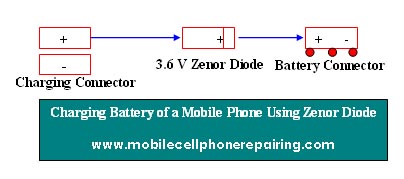
  • If the Hand Set Shows “FALSE CHARGING” then use a 3.6 Volt Zener Diode and do Direct Charging.
Charging Mobile Phone Battery Using Zener Diode